
PRACTICAL GUIDE · FICTIONAL WORKED EXAMPLE
Combine CSV files into
a checked Excel report.
Putting exports in one file is only the first step. This example shows how to map different columns, keep unreliable rows out of totals and explain where every row went.
All data is fictional. The downloadable Excel workbook is a saved sample. The included Python workflow refreshes CSV outputs and an HTML report; it does not regenerate the workbook.
01 / AGREE THE STRUCTURE
Map meaning, not just column names.
Our example has three files with 20 data rows each. Each describes sales lines, but uses a different layout. Confirm that quantity, price and identifiers mean the same thing before joining them.
| Normalized field | North CSV | South CSV | Online CSV |
|---|---|---|---|
| Order ID | Order ID | sale_ref | order_number |
| SKU | SKU | item_code | product_code |
| Quantity | Qty | quantity | units |
| Unit price | Unit Price | price_usd | unit_cost |
| Date format | YYYY-MM-DD | DD/MM/YYYY | DD-MM-YYYY |
The pack documents every mapping. Dates are parsed using each file’s agreed format, rather than guessing whether 04/05 means April 5 or May 4. Unexpected headers stop the import until the mapping is reviewed.
02 / VALIDATE BEFORE SUMMING
Separate usable rows from questions.
The sample trims surrounding spaces and normalizes SKU, region and currency. It then checks required fields, valid dates, positive whole quantities, nonnegative USD prices to two decimals, supported regions and known SKU/product pairs.
Three original rows need review: one is missing a customer, one is missing a quantity and one contains an invalid date. The workflow records the reason and original source row in generated/exceptions.csv. It does not fill those gaps with invented values.
Accepted records keep their source filename and CSV row number. That makes it possible to trace a figure in the report back to its input.
03 / DEFINE THE BUSINESS KEY
One order can contain several sales lines.
Removing duplicates by order ID alone could erase legitimate products from a multi-item order. This sample identifies a sales line by order ID plus SKU.
An identical normalized copy is excluded from totals. If a later record has the same key but conflicting values, it goes to review; the first valid occurrence is retained. Resolve conflicts against the original records before relying on the totals.
The right key depends on your data. If the same SKU can occur on multiple legitimate lines in an order, this sample’s key is insufficient. Agree a line ID or another appropriate key before adapting it.
04 / ACCOUNT FOR EVERY ROW
Make the totals explainable.
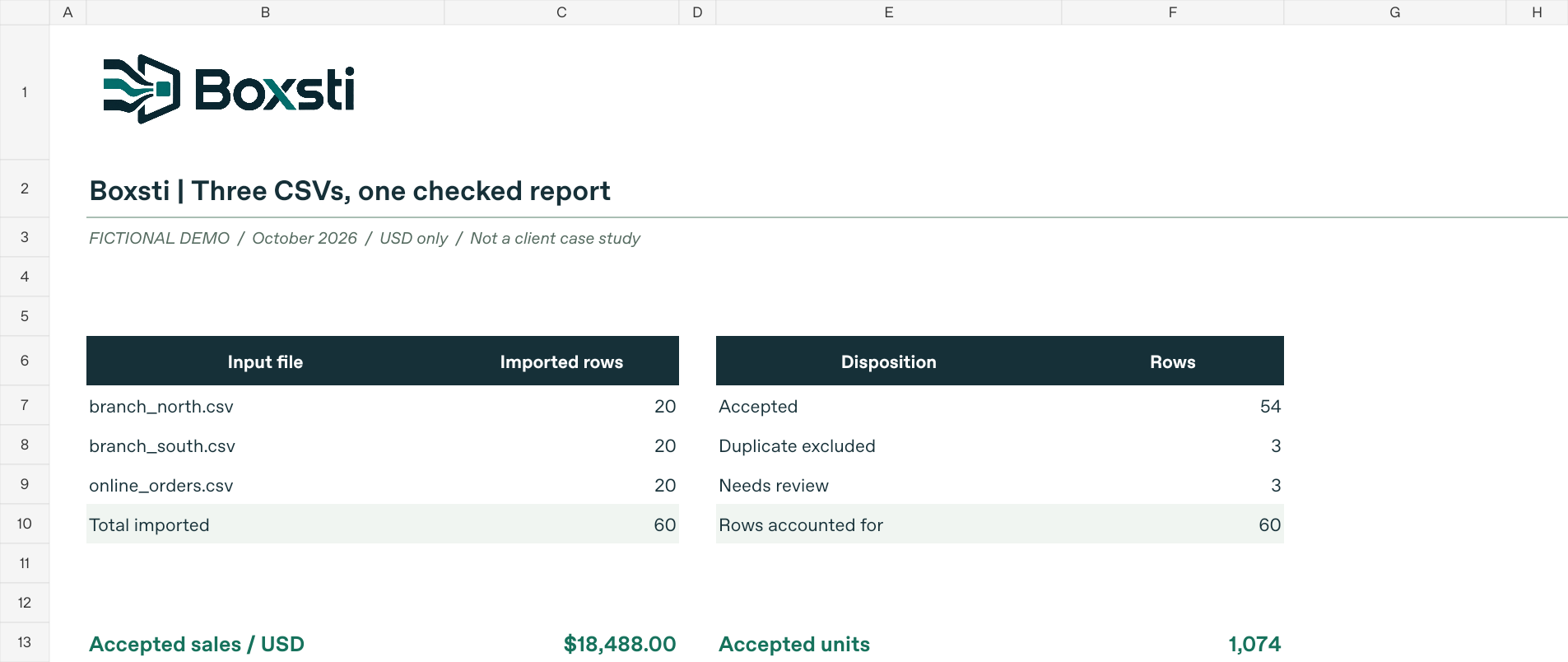
For the unchanged sample, the row reconciliation is 60 imported = 54 accepted + 3 duplicate copies + 3 rows needing correction. Rejected and duplicated rows are excluded from sales totals.
| Region | Accepted sales (USD) |
|---|---|
| North | 6,199.50 |
| South | 6,289.75 |
| Online | 5,998.75 |
| Total | 18,488.00 |
The accepted records contain 1,074 units. Each line’s sales equal quantity × unit price; tax, discounts and shipping are outside this example. Check that regional summaries add up to the accepted-row total.
05 / TRY THE WORKFLOW
Download, inspect and rerun.
- Download the full example ZIP and extract it to a local folder. Keep an unchanged copy for comparison.
- Open
README.txtfor the rules. OpenBoxsti_Excel_CSV_Demo.xlsxto inspect the saved report, orwebsite-demo.htmlin a browser. - To rerun processing, use Python 3.9 or later. Open a terminal in the extracted folder and run the command below. No third-party Python packages or API key are needed.
python make_demo.pyIf your system uses the Python launcher, the command is py make_demo.py. Rerunning overwrites the generated CSV/JSON outputs and website-demo.html using the files in input_csv/.
What should you check after running?
Compare generated/clean_sales.csv, generated/exceptions.csv and generated/region_summary.csv with the counts and totals above. For a controlled check, change a header in a copy of an input file and rerun: the workflow should stop instead of silently accepting the changed layout. Restore the original file afterwards.
What does the Excel file update?
Editing existing accepted quantity or price cells recalculates its formulas. Running Python does not refresh the workbook. Adding Excel rows requires extending formula ranges; changing validity there does not rerun validation or refresh the exception list.
This example supports only its three documented layouts and USD. It includes no accounting-system connection, currency conversion or unattended scheduling. Test any adaptation against your own agreed rules before using it for business decisions.
Have a recurring export to combine?
Tell us which files you receive, what the final report needs and what must be checked.
Discuss a scoped Excel & CSV project →